Singn up & Sign in Account
Account Deal is a leading online marketplace for buying and selling social media accounts. If you are a new user and need guidance on how to log in or create an account, you’ve come to the right place. Easily from any device.
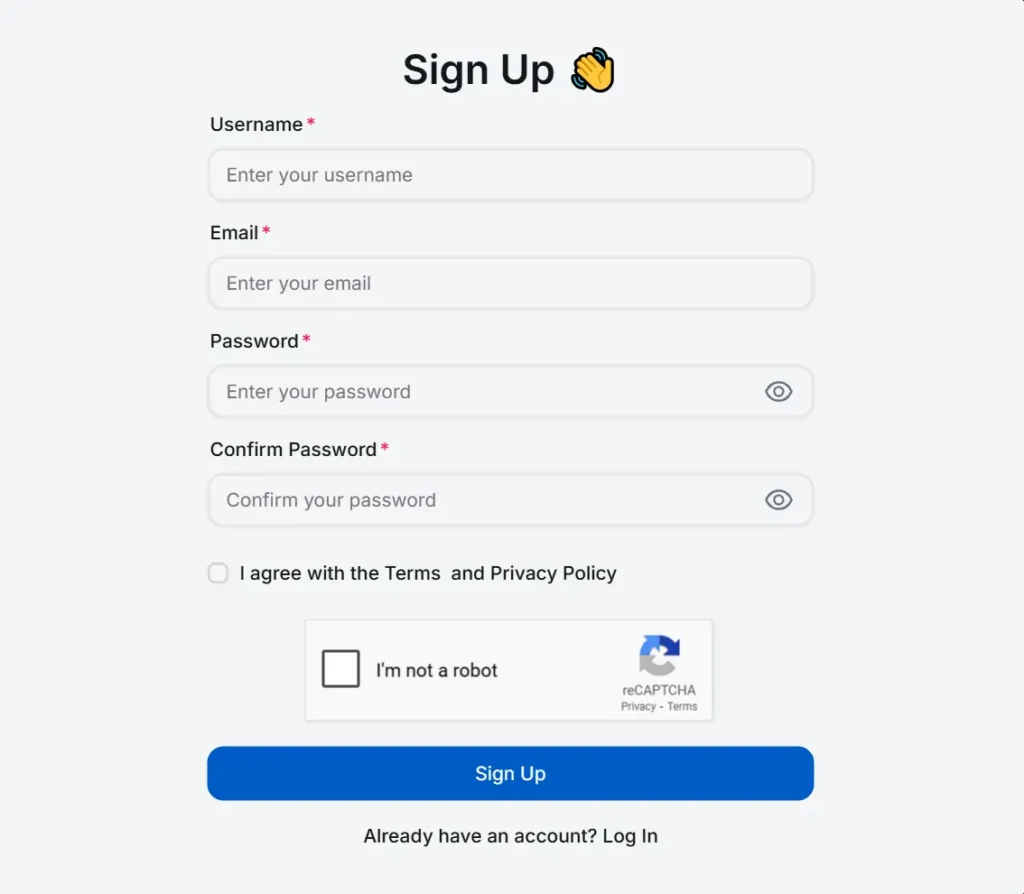
- Click the button below and create an account.
- After clicking the button it will redirect to the official website.
- On the main page of the website look for a “Login” or “Register” option, typically located at the top-right corner click on register option.
- Email: Enter a valid email address.
- Username: Choose a unique username.
- Password: Create a secure password.
- Confirm Password: Re-enter the password to confirm it.
- Existing User Option: if you already have an account, click on the link under confirm password field it will redirect to the login page of the website.
- ReCAPTCHA Verification: A checkbox labeled “I’m not a robot” is included to verify that the user is human and prevent automated sign-ups by bots.
- If you confirm that your personal information is correct, click the Register button to proceed.
Sign in Account
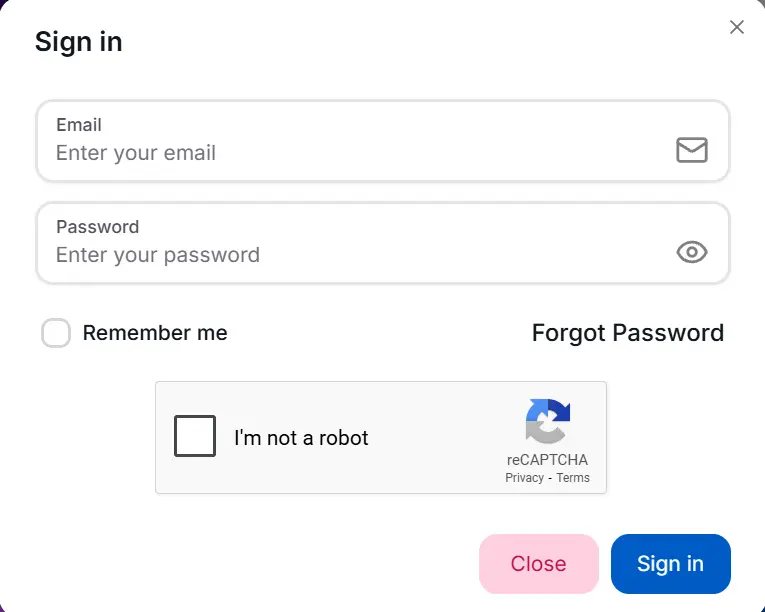
- If you already have an account, click the button below to log in.
- After clicking the button it will redirect to the official website.
- On the main page of the website look for a “Login” or “Register” option, typically located at the top-right corner click on login option.
- Enter Email or username in the first box associated with the registration account.
- In the second box enter the password associated with the account.
- If you forget the password click the reset password link.
- A check box labeled “I’m not a robot” is included for security purposes, preventing bots from logging in.
- If you agree your personal information is correct, click on the login button.
Congratulations! You have successfully signed in for an account.
Reset Password
- Click on the “Reset Password” link on the login page.
- Enter your registered email and click the “Send Password Reset Link” button.
- Check your email inbox for a password reset link.
- Open the email and click on the reset link provided.
- The link will redirect you to a secure page on the website.
- Enter your new password, confirm it, and click the “Change Password” button.
Common Login Errors
- Make sure you enter the correct username and password.
- Check if Caps Lock is on or if there are extra spaces in your credentials.
- If you forgot your password, use the “Reset Password” option.
- If your account is suspended, contact customer support.
- Complete the CAPTCHA verification properly. If it doesn’t work, refresh the page.
- Disable VPN or proxy if you’re using one, as it may block access.
- Clear your browser’s cache and cookies, then try again.
- Use an updated browser like Chrome, Firefox, or Edge.
- If the issue persists, reach out to customer support for help.
Frequently Asked Question
Enter your email or username and password, complete the CAPTCHA, and click the “LogIn” button.
Click “Reset Password,” enter your email, and follow the link sent to your inbox to create a new password.
Check if your email and password are correct, clear your browser cache, or reset your password if needed.
Yes, you can log in from any device, but extra security checks may be required.
Contact Account deal market support to unlock your account.